

Free 220-1102 Sample Questions and 100% Cover Real Exam Questions (Updated 836 Questions)
Download Real CompTIA 220-1102 Exam Dumps Test Engine Exam Questions
CompTIA A+ Certification Exam: Core 2, also known as CompTIA 220-1102, is the second part of the CompTIA A+ certification program. CompTIA A+ Certification Exam: Core 2 certification is recognized worldwide as a standard for entry-level IT professionals, and passing the Core 2 exam demonstrates competency in troubleshooting and problem-solving for networking, mobile devices, and security.
CompTIA 220-1102 certification exam tests candidates on their ability to install, configure, and maintain operating systems, including Windows, macOS, and Linux. It also covers expanded security concepts, such as threats, vulnerabilities, and common mitigation techniques. Additionally, the exam focuses on software troubleshooting, including diagnosing and resolving issues related to applications, malware, and operating systems.
NEW QUESTION # 219
The Chief Executive Officer at a bark recently saw a news report about a high-profile cybercrime where a remote-access tool that the bank uses for support was also used in this crime. The report stated that attackers were able to brute force passwords to access systems. Which of the following would BEST limit the bark's risk? (Select TWO)
- A. Enforce account lockouts after five bad password attempts
- B. Purchase a password manager for remote-access tool users
- C. Enable multifactor authentication for each support account
- D. Configure a replacement remote-access tool for support cases.
- E. Block all support accounts from logging in from foreign countries
- F. Limit remote access to destinations inside the corporate network
Answer: A,C
Explanation:
Explanation
The best ways to limit the bank's risk are to enable multifactor authentication for each support account and enforce account lockouts after five bad password attempts. Multifactor authentication adds an extra layer of security to the login process, making it more difficult for attackers to gain access to systems. Account lockouts after five bad password attempts can help to prevent brute force attacks by locking out accounts after a certain number of failed login attempts.
NEW QUESTION # 220
A technician is configuring security for a computer that is located in a common are a. A sign above the computer indicates only authorized users can use the computer. Guests visiting the office must walk past the computer to enter and leave the office. Which of the following will offer the best protection against physical threats?
- A. Installing a privacy screen
- B. Using screen lock
- C. Implementing password complexity
- D. Locking the computer case
- E. Enabling drive encryption
Answer: D
Explanation:
The best protection against physical threats, especially in a common area where the computer is publicly accessible, involves physically securing the hardware.
Option A: Using screen lockScreen locks are good for securing access temporarily but do not protect against physical tampering or theft.
Option B: Installing a privacy screenPrivacy screens prevent visual access but do not secure the hardware.
Option C: Implementing password complexityPassword complexity helps secure digital access but does not prevent physical threats.
Option D: Locking the computer casePhysically securing the case prevents unauthorized individuals from tampering with internal components or stealing the computer.
Option E: Enabling drive encryptionEncryption protects data but does not prevent physical access to the hardware itself.
Reference:
CompTIA A+ 220-1102 Objective 2.1 (Physical security), particularly physical security measures like locking the computer case.
NEW QUESTION # 221
An organization is updating the monitors on kiosk machines. While performing the upgrade, the organization would like to remove physical input devices. Which of the following utilities in the Control Panel can be used to turn on the on-screen keyboard to replace the physical input devices?
* Devices and Printers
- A. Programs and Features
- B. Device Manager
- C. Ease of Access
Answer: A
Explanation:
Ease of Access is a utility in the Control Panel that allows users to adjust various accessibility settings on Windows, such as the on-screen keyboard, magnifier, narrator, high contrast, etc. The on-screen keyboard can be turned on by going to Ease of Access > Keyboard and toggling the switch to On12. Alternatively, the on-screen keyboard can be opened by pressing Windows + Ctrl + O keys or by typing osk.exe in the Run dialog box3.
References: 1 Use the On-Screen Keyboard (OSK) to
type(https://support.microsoft.com/en-us/windows/use-the-on-screen-keyboard-osk-to-type-ecbb5e08-5b4e-d8c8 to Enable or Disable the On-Screen Keyboard in Windows 10 - Lifewire(https://www.lifewire.com/enable-or-disable-on-screen-keyboard-in-windows-10-5180667)3 On-Screen Keyboard Settings, Tips and Tricks in Windows
11/10(https://www.thewindowsclub.com/windows-onscreen-keyboard).
NEW QUESTION # 222
A bank would like to enhance building security in order to prevent vehicles from driving into the building while also maintaining easy access for customers. Which of the following BEST addresses this need?
- A. Motion sensors
- B. Bollards
- C. Guards
- D. Access control vestibule
Answer: B,C
NEW QUESTION # 223
A technician needs lo formal a USB drive to transfer 20GB of data from a Linux computer to a Windows computer. Which of the following filesystems will the technician MOST likely use?
- A. NTFS
- B. exFAT
- C. FAT32
- D. ext4
Answer: A
NEW QUESTION # 224
A technician needs to exclude an application folder from being cataloged by a Windows 10 search. Which of the following utilities should be used?
- A. Indexing Options
- B. System
- C. Privacy
- D. Device Manager
Answer: A
Explanation:
To exclude an application folder from being cataloged by a Windows 10 search, the technician should use the Indexing Options utility1
NEW QUESTION # 225
Which of the following operating systems uses the ext4 filesystem type?
- A. iOS
- B. Windows
- C. macOS
- D. Linux
Answer: D
Explanation:
The ext4 (fourth extended filesystem) is a journaling file system for Linux. It is widely used in many Linux distributions due to its performance, robustness, and advanced features like large file and volume support.
* macOS: Uses filesystems like HFS+ or APFS.
* iOS: Uses APFS (Apple File System).
* Linux: Uses ext4 among other filesystems like ext3, XFS, Btrfs, etc.
* Windows: Uses NTFS, FAT32, and exFAT, not ext4.
Reference: CompTIA A+ Exam Objectives [220-1102] - 1.1: Compare and contrast common operating system types and their purposes.
NEW QUESTION # 226
A network administrator is setting up the security for a SOHO wireless network. Which of the following options should the administrator enable to secure the network?
- A. NAT
- B. WPA3
- C. 802.1X
- D. Static IP
Answer: B
Explanation:
To secure a SOHO wireless network, enabling WPA3 is the recommended option. WPA3 (Wi-Fi Protected Access 3) is the latest security certification program developed by the Wi-Fi Alliance to secure wireless computer networks. It provides cutting-edge security protocols and cryptographic methods to enhance and replace its predecessors, WPA2 and WPA, offering improved protection against brute-force attacks and ensuring better privacy on public networks.
NEW QUESTION # 227
Which of the following languages is used for scripting the creation of Active Directory accounts?
- A. Bash
- B. PowerShell
- C. PHP
- D. SQL
Answer: B
Explanation:
PowerShell is a scripting language that can interact with Active Directory and other Windows components. It has a built-in cmdlet called New-ADUser that can create user accounts in Active Directory. PowerShell can also use the Active Directory module to access other AD-related functions and attributes. Other languages, such as Bash, SQL, and PHP, are not designed for creating Active Directory accounts and would require additional tools or libraries to do so
NEW QUESTION # 228
Which of the following is the most likely to use NTFS as the native filesystem?
- A. Windows
- B. Android
- C. Linux
- D. macOS
Answer: A
Explanation:
NTFS stands for New Technology File System, which is a proprietary file system developed by Microsoft4. NTFS is the default file system for the Windows NT family of operating systems, which includes Windows 10, Windows Server 2019, and other versions5. NTFS provides features such as security, encryption, compression, journaling, and large volume support45. NTFS is not the native file system for other operating systems, such as macOS, Linux, or Android, although some of them can read or write to NTFS volumes with third-party drivers or tools
NEW QUESTION # 229
Which of the following filesystem formats would be the BEST choice to ensure read and write compatibility of USB flash drives across several generations of Microsoft operating systems?
- A. FAT32
- B. ext4
- C. APFS
- D. CDFS
Answer: A
Explanation:
Explanation
The best filesystem format to ensure read and write compatibility of USB flash drives across several generations of Microsoft operating systems is FAT32. FAT32 stands for File Allocation Table 32-bit and is a filesystem format that organizes and manages files and folders on storage devices using 32-bit clusters. FAT32 is compatible with most Microsoft operating systems since Windows 95 OSR2, as well as other operating systems such as Linux and Mac OS X. FAT32 can support storage devices up to 2TB in size and files up to
4GB in size. APFS stands for Apple File System and is a filesystem format that organizes and manages files and folders on storage devices using encryption, snapshots and cloning features. APFS is compatible with Mac OS X 10.13 High Sierra and later versions but not with Microsoft operating systems natively. Ext4 stands for Fourth Extended File System and is a filesystem format that organizes and manages files and folders on storage devices using journaling, extents and delayed allocation features. Ext4 is compatible with Linux operating systems but not with Microsoft operating systems natively.
NEW QUESTION # 230
An MDM report shows that a user's company cell phone has unauthorized applications installed. The device has recently checked into the MDM server, and the company still has access to remotely wipe the device. Which of the following describes the action the user has performed?
- A. Upgraded the OS
- B. Obtained root access
- C. Uninstalled the MDM software
- D. Installed a VPN
Answer: B
Explanation:
Comprehensive and Detailed In-Depth
If an MDM (Mobile Device Management) solution detects unauthorized applications, it is likely that the user has rooted (Android) or jailbroken (iOS) the device to bypass security restrictions. Root access allows the user to install unauthorized applications that MDM policies would normally block.
B . Upgraded the OS - Incorrect. Upgrading the OS does not bypass security policies or allow unauthorized apps.
C . Installed a VPN - Incorrect. A VPN does not affect the MDM system or allow unauthorized apps.
D . Uninstalled the MDM software - Incorrect. If the MDM software was removed, the device would not still be reporting to the MDM server.
Reference:
CompTIA A+ 220-1102, Objective 2.7 - Mobile Device Security and MDM
NEW QUESTION # 231
After a security event, a technician removes malware from an affected laptop and disconnects the laptop from the network. Which of the following should the technician do to prevent the operating system from automatically returning to an infected state?
- A. Disable antivirus.
- B. Enable System Restore.
- C. Disable System Restore.
- D. Educate the user.
- E. Enable antivirus.
Answer: E
Explanation:
System Restore is a feature that allows the user to revert the system to a previous state. However, this can also restore the malware that was removed by the technician. Disabling System Restore can prevent the operating system from automatically returning to an infected state. Enabling antivirus, educating the user, and enabling System Restore are good preventive measures, but they do not address the question. Disabling antivirus can make the system more vulnerable to malware attacks
NEW QUESTION # 232
A department has the following technical requirements for a new application: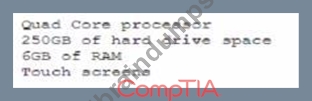
The company plans to upgrade from a 32-bit Windows OS to a 64-bit OS. Which of the following will the company be able to fully take advantage of after the upgrade?
- A. CPU
- B. Touch screen
- C. RAM
- D. Hard drive
Answer: C
Explanation:
https://www.makeuseof.com/tag/difference-32-bit-64-bit-windows/
After upgrading from a 32-bit Windows OS to a 64-bit OS, the company will be able to fully take advantage of the RAM of the computer. This is because a 64-bit operating system is able to use larger amounts of RAM compared to a 32-bit operating system, which may benefit the system's overall performance if it has more than 4GB of RAM installed
NEW QUESTION # 233
You have been contacted through the help desk chat application. A user is setting up a replacement SOHO router. Assist the user with setting up the router.
INSTRUCTIONS
Select the most appropriate statement for each response. Click the send button after each response to continue the chat. If at any time you would like to bring back the initial state of the simulation, please click the Reset All button.
Answer:
Explanation:
See the solution below in Explanation.
Explanation: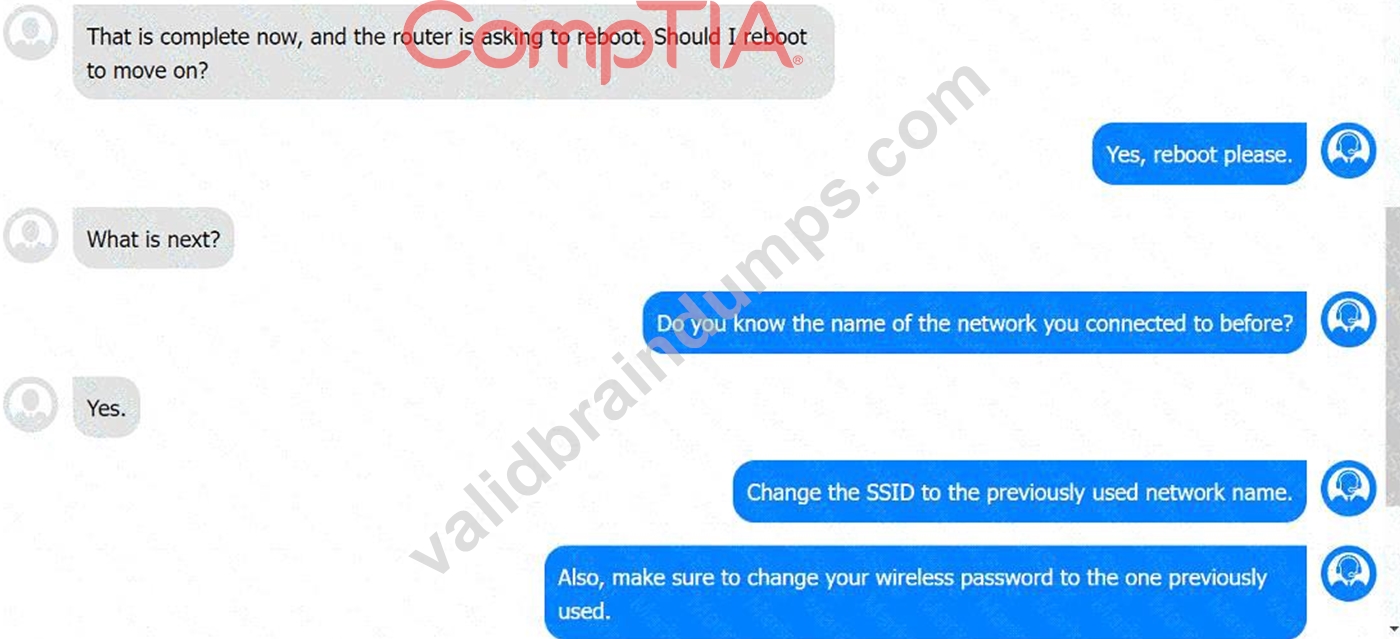
NEW QUESTION # 234
A Windows user recently replaced a computer The user can access the public internet on the computer; however, an internal site at https7/companyintranet.com:8888 is no longer loading. Which of the following should a technician adjust to resolve the issue?
- A. IP address settings
- B. Firewall settings
- C. DHCP settings
- D. Antivirus settings
- E. Default gateway settings
Answer: B
Explanation:
Explanation
The technician should adjust the firewall settings to resolve the issue of not being able to access an internal site at https://companyintranet.com:8888. The firewall settings control how the firewall filters and allows network traffic based on rules and policies. The firewall settings may be blocking or preventing the access to the internal site by mistake or by default, especially if the site uses a non-standard port number such as 8888. The technician should check and modify the firewall settings to allow the access to the internal site or its port number. Default gateway settings determine how a computer connects to other networks or the internet.
Default gateway settings are not likely to cause the issue of not being able to access an internal site if the user can access the public internet. DHCP settings determine how a computer obtains its IP address and other network configuration parameters automatically from a DHCP server. DHCP settings are not likely to cause the issue of not being able to access an internal site if the user can access other network resources. IP address settings determine how a computer identifies itself and communicates with other devices on a network. IP address settings are not likely to cause the issue of not being able to access an internal site if the user can access other network resources. Antivirus settings control how the antivirus software scans and protects the computer from malware and threats. Antivirus settings are less likely to cause the issue of not being able to access an internal site than firewall settings, unless the antivirus software has its own firewall feature that may interfere with the network traffic. References: CompTIA A+ Core 2 (220-1002) Certification Exam Objectives Version 4.0, Domain 1.6
NEW QUESTION # 235
A user requested that the file permissions on a Linux device be changed to only allow access to a certain group of users. Which of the following commands should be used to complete the user's request?
- A. cacls
- B. pwd
- C. chmod
- D. cat
Answer: C
Explanation:
The chmod command is used to change the permissions of files and directories in Linux.
It can grant or revoke read, write, and execute permissions for the owner, the group, and others. To change the file permissions to only allow access to a certain group of users, the chmod command can use either the symbolic or the numeric mode. For example, to give read and write permissions to the group and no permissions to others, the command can be:
chmod g+rw,o-rwx filename
or
chmod 660 filename
NEW QUESTION # 236
A user is unable to access files on a work PC after opening a text document. The text document was labeled "URGENT PLEASE READ.txt - In active folder, .txt file titled urgent please read". Which of the following should a support technician do FIRST?
- A. Investigate how malicious software was Installed.
- B. Quarantine the host in the antivirus system.
- C. Reimage the computer.
- D. Run antivirus scan tor malicious software.
Answer: D
Explanation:
Running an antivirus scan for malicious software is the first step that a support technician should do when a user reports a virus on a PC. The antivirus scan can detect and remove the virus, as well as prevent further damage or infection. Quarantining the host, investigating how the malware was installed and reimaging the computer are possible steps that can be done after running the antivirus scan, depending on the situation and the results of the scan. Verified Reference: https://www.comptia.org/blog/how-to-remove-a-virus https://www.comptia.org/certifications/a
NEW QUESTION # 237
A workstation is displaying a message indicating that a user must exchange cryptocurrency for a decryption key. Which of the following is the best way for a technician to return the device to service safely?
- A. Run an AV scan.
- B. Perform a system restore.
- C. Reinstall the operating system
- D. Install a software firewall.
- E. Comply with the on-screen instructions.
Answer: C
Explanation:
The best way for a technician to return the device to service safely is to reinstall the operating system. This is because the device is infected by ransomware, which is a form of malware that encrypts files and demands payment for decryption. Reinstalling the operating system will erase the ransomware and restore the device to its original state. However, this will also delete any data that was not backed up before the infection. Therefore, it is important to have regular backups of critical data and protect them from ransomware attacks1.
The other options are not effective or safe for ransomware recovery. Running an AV scan may not detect or remove the ransomware, especially if it is a new or unknown variant. Installing a software firewall may prevent future attacks, but it will not help with the current infection. Performing a system restore may not work if the ransomware has corrupted or deleted the restore points. Complying with the on-screen instructions is not advisable, as it will encourage the attackers and there is no guarantee that they will provide the decryption key after receiving the payment.
To prevent and recover from ransomware attacks, it is recommended to follow some best practices, such as234:
Use strong passwords and multifactor authentication for all accounts and devices.
Keep all software and firmware updated with the latest security patches.
Avoid opening suspicious or unsolicited emails and attachments.
Educate users and staff on how to recognize and report phishing and social engineering attempts.
Use antivirus software and enable real-time protection.
Enable network segmentation and firewall rules to limit the spread of ransomware.
Implement a Zero Trust security model to verify all requests and devices before granting access.
Create and test backups of critical data and store them offline or in a separate network.
Recover safely by isolating the infected devices, identifying the ransomware variant, and restoring data from backups.
Report any ransomware incidents to law enforcement agencies and seek help from experts.
NEW QUESTION # 238
A department has the following technical requirements for a new application:
The company plans to upgrade from a 32-bit Windows OS to a 64-bit OS. Which of the following will the company be able to fully take advantage of after the upgrade?
- A. CPU
- B. Touch screen
- C. RAM
- D. Hard drive
Answer: C
Explanation:
Explanation
https://www.makeuseof.com/tag/difference-32-bit-64-bit-windows/
After upgrading from a 32-bit Windows OS to a 64-bit OS, the company will be able to fully take advantage of the RAM of the computer. This is because a 64-bit operating system is able to use larger amounts of RAM compared to a 32-bit operating system, which may benefit the system's overall performance if it has more than
4GB of RAM installed
NEW QUESTION # 239
Antivirus software indicates that a workstation is infected with ransomware that cannot be quarantined. Which of the following should be performed FIRST to prevent further damage to the host and other systems?
- A. Power off the machine.
- B. Remove the LAN card.
- C. Install a different endpoint solution.
- D. Run a full antivirus scan.
Answer: A
Explanation:
Ransomware is a type of malware that encrypts the files on a system and demands a ransom for their decryption1. Ransomware can also spread to other systems on the network or exfiltrate sensitive data to the attackers2. Therefore, it is important to isolate the infected machine as soon as possible to contain the infection and prevent further damage3. Powering off the machine is a quick and effective way of disconnecting it from the network and stopping any malicious processes running on it12. The other options are not directly related to preventing ransomware damage or may not be effective. Running a full antivirus scan may not be able to detect or remove the ransomware, especially if it is a new or unknown variant1. Removing the LAN card may disconnect the machine from the network, but it may not stop any malicious processes running on it or any data encryption or exfiltration that has already occurred2. Installing a different endpoint solution may not be possible or helpful if the system is already infected and locked by ransomware1.
NEW QUESTION # 240
......
CompTIA 220-1102 exam covers a wide range of topics, including installing and configuring operating systems, configuring network connectivity, implementing virtualization and cloud computing, and troubleshooting software and hardware problems. 220-1102 exam consists of 90 multiple-choice questions that are designed to test the candidate's knowledge and skills in the above-mentioned areas.
New 220-1102 exam dumps Use Updated CompTIA Exam: https://www.validbraindumps.com/220-1102-exam-prep.html
Verified 220-1102 Dumps Q&As - 220-1102 Test Engine with Correct Answers: https://drive.google.com/open?id=13pGQ-yQMYOtGGKaR2Am-niocW9MzOs5p