

[Apr 11, 2024] 100% Real & Accurate Associate-Cloud-Engineer Questions with Free and Fast Updates
Self-Study Guide for Becoming an Google Associate Cloud Engineer Exam Expert
The Google Associate Cloud Engineer certification is designed to measure the candidates’ fundamental skills required to perform the deployment, monitoring, and maintenance of projects on Google Cloud. This certificate is a good starting point for those individuals who are new to Cloud and can be used as a stepping stone to the professional-level certifications of this vendor. To get certified, the applicants are required to complete one exam. The qualifying test measures the ability of the specialists to perform the following tasks: setting up the Cloud solution environment; planning and configuring Cloud solutions; deploying and implementing Cloud solutions; ensuring the effective operation of Cloud solutions; and configuring access & security.
NEW QUESTION # 114
Your company has a large quantity of unstructured data in different file formats. You want to perform ETL transformations on the dat a. You need to make the data accessible on Google Cloud so it can be processed by a Dataflow job. What should you do?
- A. Upload the data into Cloud Spanner using the import function in the console.
- B. Upload the data into Cloud SQL using the import function in the console.
- C. Upload the data to BigQuery using the bq command line tool.
- D. Upload the data to Cloud Storage using the gsutil command line tool.
Answer: D
Explanation:
"large quantity" : Cloud Storage or BigQuery "files" a file is nothing but an Object
NEW QUESTION # 115
You are hosting an application from Compute Engine virtual machines (VMs) in us-central1-a. You want to adjust your design to support the failure of a single Compute Engine zone, eliminate downtime, and minimize cost. What should you do?
- A. - Create a Managed Instance Group and specify us-central1-a as the zone.
-Configure the Health Check with a short Health Interval. - B. - Perform regular backups of your application.
-Create a Cloud Monitoring Alert and be notified if your application becomes unavailable.
-Restore from backups when notified. - C. - Create Compute Engine resources in us-central1-b.
-Balance the load across both us-central1-a and us-central1-b. - D. - Create an HTTP(S) Load Balancer.
-Create one or more global forwarding rules to direct traffic to your VMs.
Answer: C
Explanation:
Explanation
Choosing a region and zone You choose which region or zone hosts your resources, which controls where your data is stored and used. Choosing a region and zone is important for several reasons:
Handling failures
Distribute your resources across multiple zones and regions to tolerate outages. Google designs zones to be independent from each other: a zone usually has power, cooling, networking, and control planes that are isolated from other zones, and most single failure events will affect only a single zone. Thus, if a zone becomes unavailable, you can transfer traffic to another zone in the same region to keep your services running.
Similarly, if a region experiences any disturbances, you should have backup services running in a different region. For more information about distributing your resources and designing a robust system, see Designing Robust Systems. Decreased network latency To decrease network latency, you might want to choose a region or zone that is close to your point of service.
https://cloud.google.com/compute/docs/regions-zones#choosing_a_region_and_zone
NEW QUESTION # 116
You deployed an App Engine application using gcloud app deploy, but it did not deploy to the intended project. You want to find out why this happened and where the application deployed. What should you do?
- A. Check the app.yaml file for your application and check project settings.
- B. Go to Cloud Shell and run gcloud config list to review the Google Cloud configuration used for deployment.
- C. Go to Deployment Manager and review settings for deployment of applications.
- D. Check the web-application.xml file for your application and check project settings.
Answer: A
NEW QUESTION # 117
You want your application hosted on a VM to fetch metadata of that instance.
Which command will help you to fetch it?
- A. curl metadata.google.internal/computeMetadata/v1/
- B. curl metadata.google.internal/compute-metadata/v1/
- C. curl <instance-private-ip>/metadata/v1/
- D. curl internal.googleapi.com/computeMetadata/v1/
Answer: A
NEW QUESTION # 118
You and your team have been working on a new application over the past couple weeks. While it's still in development, it's becoming a bit costly for your limited budget. The entire team had a meeting on Friday to talk about how to save money until you're able to launch. One of your team members suggested shutting down some services overnight and during the weekend. Though no official decision was made before leaving for the weekend, a junior team member sent out an email saying he found a solution to the problem.
When arriving at the office on Monday, you find that your project is no longer in the drop-down inside the Console. What's the most likely reason for the missing project?
- A. The engineer removed the project and attached all of the resources directly to the Organization.
- B. The engineer clicked the "shut down" link thinking it was like a light switch that he could toggle on and off.
- C. Your trial credits expired, and the project was removed.
- D. The project was moved to another account.
Answer: B
NEW QUESTION # 119
Your project has all its Compute Engine resources in the europe-west1 region. You want to set europe-west1 as the default region for gcloud commands. What should you do?
- A. Use Cloud Shell instead of the command line interface of your device. Launch Cloud Shell after you navigate to a resource in the europe-west1 region. The europe-west1 region will automatically become the default region.
- B. Create a VPN from on-premises to a subnet in europe-west1, and use that connection when executing gcloud commands.
- C. Use "gcloud config set compute/region europe-west1" to set the default region for future gcloud commands.
- D. Use "gcloud config set compute/zone europe-west1" to set the default region for future gcloud commands.
Answer: C
Explanation:
A is not correct because Cloud Shell will not default to the location that it's launched from.
B is correct because this will ensure that the relevant region is used when not overwritten by a command parameter.
C is not correct because this command should be used to set a zone, not a region.
D is not correct because a VPN to a specific subnet does not have any effect on the gcloud command region.
https://cloud.google.com/compute/docs/regions-zones/changing-default-zone-region
NEW QUESTION # 120
You're attempting to set up a new budget with some alerts. Your team lead asked you to use last months spending as a reference for the budget amount. What's the best way to configure this budget?
- A. Locate the spending data from the File export; use that as the budget amount.
- B. Locate the spending data from the BigQuery export; use that as the budget amount.
- C. Use the "Last month's spend" option to allow Google Cloud to determine the budget amount.
- D. Look at the spending data and locate the amount; use that as the budget amount.
Answer: C
NEW QUESTION # 121
Your company has a single sign-on (SSO) identity provider that supports Security Assertion Markup Language (SAML) integration with service providers. Your company has users in Cloud Identity. You would like users to authenticate using your company's SSO provider.
What should you do?
- A. Obtain OAuth 2.0 credentials, configure the user consent screen, and set up OAuth 2.0 for Mobile
& Desktop Apps. - B. In Cloud Identity, set up SSO with Google as an identity provider to access custom SAML apps.
- C. Obtain OAuth 2.0 credentials, configure the user consent screen, and set up OAuth 2.0 for Web Server Applications.
- D. In Cloud Identity, set up SSO with a third-party identity provider with Google as a service provider.
Answer: D
Explanation:
https://support.google.com/cloudidentity/answer/6262987?hl=en&ref_topic=7558767 Google offers a SAML-based single sign-on (SSO) service that provides partner companies with full control over the authorization and authentication of hosted user accounts that can access web-based applications like Gmail or Google Calendar. Using the SAML model, Google acts as the service provider and provides services such as Gmail and Start Pages.
NEW QUESTION # 122
You are operating a Google Kubernetes Engine (GKE) cluster for your company where different teams can run non-production workloads. Your Machine Learning (ML) team needs access to Nvidia Tesla P100 GPUs to train their models. You want to minimize effort and cost. What should you do?
- A. Recreate all the nodes of the GKE cluster to enable GPUs on all of them.
- B. Ask your ML team to add the "accelerator: gpu" annotation to their pod specification.
- C. Create your own Kubernetes cluster on top of Compute Engine with nodes that have GPUs. Dedicate this cluster to your ML team.
- D. Add a new, GPU-enabled, node pool to the GKE cluster. Ask your ML team to add the cloud.google.com/gke -accelerator: nvidia-tesla-p100 nodeSelector to their pod specification.
Answer: D
Explanation:
This is the most optimal solution. Rather than recreating all nodes, you create a new node pool with GPU enabled. You then modify the pod specification to target particular GPU types by adding node selector to your workloads Pod specification. YOu still have a single cluster so you pay Kubernetes cluster management fee for just one cluster thus minimizing the cost. Ref: https://cloud.google.com/kubernetes-engine/docs/how-to/gpus Ref: https://cloud.google.com/kubernetes-engine/pricing Example:
apiVersion: v1
kind: Pod
metadata:
name: my-gpu-pod
spec:
containers:
name: my-gpu-container
image: nvidia/cuda:10.0-runtime-ubuntu18.04
command: [/bin/bash]
resources:
limits:
nvidia.com/gpu: 2
nodeSelector:
cloud.google.com/gke-accelerator: nvidia-tesla-k80 # or nvidia-tesla-p100 or nvidia-tesla-p4 or nvidia-tesla-v100 or nvidia-tesla-t4
NEW QUESTION # 123
Several employees at your company have been creating projects with Cloud Platform and paying for it with their personal credit cards, which the company reimburses. The company wants to centralize all these projects under a single, new billing account. What should you do?
- A. In the Google Cloud Platform Console, create a new billing account and set up a payment method.
- B. Contact [email protected] with your bank account details and request a corporate billing account for your company.
- C. Create a ticket with Google Support and wait for their call to share your credit card details over the phone.
- D. In the Google Platform Console, go to the Resource Manage and move all projects to the root Organization.
Answer: A
NEW QUESTION # 124
You've finally been given a new laptop, but you need to install all of the tools you need. You already installed the Cloud SDK, but none of the commands seem to be working correctly. What step did you likely forget?
- A. gcloud config list
- B. gcloud config_list
- C. gcloud init
- D. gcloud application_init
Answer: A,C
NEW QUESTION # 125
You deployed a new application inside your Google Kubernetes Engine cluster using the YAML file specified below.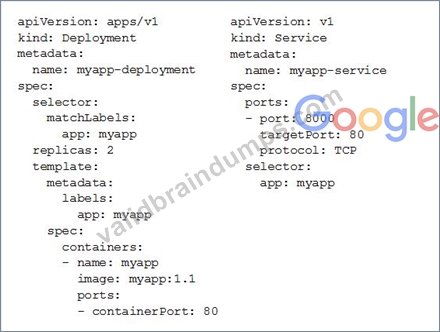
You check the status of the deployed pods and notice that one of them is still in PENDING status:
You want to find out why the pod is stuck in pending status. What should you do?
- A. Review details of the myapp-deployment Deployment object and check for error messages.
- B. View logs of the container in myapp-deployment-58ddbbb995-lp86m pod and check for warning messages.
- C. Review details of the myapp-service Service object and check for error messages.
- D. Review details of myapp-deployment-58ddbbb995-lp86m Pod and check for warning messages.
Answer: D
Explanation:
Reference:
https://cloud.google.com/run/docs/gke/troubleshooting
NEW QUESTION # 126
You are setting up a Windows VM on Compute Engine and want to make sure you can log in to the VM via RDP. What should you do?
- A. When creating the VM, add metadata to the instance using `windows-password' as the key and a password as the value.
- B. After the VM has been created, use gcloud compute reset-windows-password to retrieve the login credentials for the VM.
- C. After the VM has been created, use your Google Account credentials to log in into the VM.
- D. After the VM has been created, download the JSON private key for the default Compute Engine service account. Use the credentials in the JSON file to log in to the VM.
Answer: B
Explanation:
If the Windows account does not exist, this command will cause the account to be created and the password for that new account will be returned.
https://cloud.google.com/sdk/gcloud/reference/beta/compute/reset-windows-password
NEW QUESTION # 127
You have an on-premises data analytics set of binaries that processes data files in memory for about 45 minutes every midnight. The sizes of those data files range from 1 gigabyte to 16 gigabytes. You want to migrate this application to Google Cloud with minimal effort and cost. What should you do?
- A. Upload the code to Cloud Functions. Use Cloud Scheduler to start the application.
- B. Create a container for the set of binaries. Use Cloud Scheduler to start a Cloud Run job for the container.
- C. Create a container for the set of binaries Deploy the container to Google Kubernetes Engine (GKE) and use the Kubernetes scheduler to start the application.
- D. Lift and shift to a VM on Compute Engine. Use an instance schedule to start and stop the instance.
Answer: B
NEW QUESTION # 128
Your company uses Cloud Storage to store application backup files for disaster recovery purposes. You want to follow Google's recommended practices. Which storage option should you use?
- A. Nearline Storage
- B. Multi-Regional Storage
- C. Regional Storage
- D. Coldline Storage
Answer: D
Explanation:
Reference:
https://cloud.google.com/blog/products/gcp/introducing-coldline-and-a-unified-platform-for-data-storage Cloud Storage Coldline: a low-latency storage class for long-term archiving Coldline is a new Cloud Storage class designed for long-term archival and disaster recovery. Coldline is perfect for the archival needs of big data or multimedia content, allowing businesses to archive years of data. Coldline provides fast and instant (millisecond) access to data and changes the way that companies think about storing and accessing their cold data.
NEW QUESTION # 129
All development (dev) teams in your organization are located in the United States. Each dev team has its own Google Cloud project. You want to restrict access so that each dev team can only create cloud resources in the United States (US). What should you do?
- A. Create a folder to contain all the dev projects Create an organization policy to limit resources in US locations.
- B. Create an Identity and Access Management (IAM)policy to restrict the resources locations in all dev projects. Apply the policy to all dev roles.
- C. Create an Identity and Access Management <IAM) policy to restrict the resources locations in the US.
Apply the policy to all dev projects. - D. Create an organization to contain all the dev projects. Create an Identity and Access Management (IAM) policy to limit the resources in US regions.
Answer: C
NEW QUESTION # 130
Your Dataproc cluster runs in a single Virtual Private Cloud (VPC) network in a single subnet with range
172.16.20.128/25. There are no private IP addresses available in the VPC network. You want to add new VMs to communicate with your cluster using the minimum number of steps. What should you do?
- A. Modify the existing subnet range to 172.16.20.0/24.
- B. Create a new VPC network for the VMs. Enable VPC Peering between the VMs' VPC network and the Dataproc cluster VPC network.
- C. Create a new VPC network for the VMs with a subnet of 172.32.0.0/16. Enable VPC network Peering between the Dataproc VPC network and the VMs VPC network. Configure a custom Route exchange.
- D. Create a new Secondary IP Range in the VPC and configure the VMs to use that range.
Answer: A
Explanation:
Explanation
/25:
CIDR to IP Range
Result
CIDR Range 172.16.20.128/25
Netmask 255.255.255.128
Wildcard Bits 0.0.0.127
First IP 172.16.20.128
First IP (Decimal) 2886734976
Last IP 172.16.20.255
Last IP (Decimal) 2886735103
Total Host 128
CIDR
172.16.20.128/25
/24:
CIDR to IP Range
Result
CIDR Range 172.16.20.128/24
Netmask 255.255.255.0
Wildcard Bits 0.0.0.255
First IP 172.16.20.0
First IP (Decimal) 2886734848
Last IP 172.16.20.255
Last IP (Decimal) 2886735103
Total Host 256
CIDR
172.16.20.128/24
NEW QUESTION # 131
Your company publishes large files on an Apache web server that runs on a Compute Engine instance. The Apache web server is not the only application running in the project. You want to receive an email when the egress network costs for the server exceed 100 dollars for the current month as measured by Google Cloud Platform (GCP). What should you do?
- A. Set up a budget alert on the project with an amount of 100 dollars, a threshold of 100%, and notification type of "email."
- B. Use the Stackdriver Logging Agent to export the Apache web server logs to Stackdriver Logging.
Create a Cloud Function that uses BigQuery to parse the HTTP response log data in Stackdriver for the current month and sends an email if the size of all HTTP responses, multiplied by current GCP egress prices, totals over 100 dollars. Schedule the Cloud Function using Cloud Scheduler to run hourly. - C. Set up a budget alert on the billing account with an amount of 100 dollars, a threshold of 100%, and notification type of "email."
- D. Export the billing data to BigQuery.
Create a Cloud Function that uses BigQuery to sum the egress network costs of the exported billing data for the Apache web server for the current month and sends an email if it is over 100 dollars.
Schedule the Cloud Function using Cloud Scheduler to run hourly.
Answer: D
Explanation:
The Apache web server is not the only application running in the project, so the budget alert is not suitable because it is related to all applications and not only the network traffic as needed.
NEW QUESTION # 132
......
Google Associate-Cloud-Engineer certification is an exam that is designed for those individuals who are looking to establish themselves as a Google Cloud engineer. The Google Cloud platform is a powerful tool that provides users with the ability to create and manage complex applications and data systems. With the Associate-Cloud-Engineer certification, individuals can demonstrate their knowledge and expertise in using this platform to create innovative solutions for their clients.
Google Associate-Cloud-Engineer Certification Exam is an excellent opportunity for IT professionals to validate their skills and knowledge in cloud computing. It is a valuable credential for individuals who want to advance their careers in the IT industry and gain recognition for their expertise in Google Cloud technologies. With the increasing demand for cloud computing professionals, obtaining this certification can open up new career opportunities and help individuals stay competitive in the job market.
Associate-Cloud-Engineer Study Guide Realistic Verified Associate-Cloud-Engineer Dumps: https://www.validbraindumps.com/Associate-Cloud-Engineer-exam-prep.html
Associate-Cloud-Engineer Questions & Practice Test are Available On-Demand: https://drive.google.com/open?id=1u4RERyx9hkzjIjJAG8VuN5qDp6gIR8Mv