

Associate-Android-Developer Practice Google Verified Answers - Pass Your Exams For Sure! [2021]
Valid Way To Pass Google Developers's Associate-Android-Developer Exam
NEW QUESTION 14
A class that you create for managing multiple data sources. In addition to a Room database, this class could manage remote data sources such as a web server. It is about:
- A. Activity/Fragment
- B. Repository
- C. Room database
- D. ViewModel
Answer: B
NEW QUESTION 15
Custom duration in milliseconds as a parameter for the setDuration method is available when you are working with:
- A. Toast
- B. for none of them
- C. for both of them
- D. Snackbar
Answer: D
NEW QUESTION 16
An overridden method onCreateOptionsMenu in an Activity returns boolean value. What does this value mean?
- A. You can return any value: the menu will be displayed anyway.
- B. You must return true for the menu to be displayed; if you return false it will not be shown.
- C. You must return false for the menu to be displayed; if you return true it will not be shown.
Answer: B
Explanation:
Reference:
https://developer.android.com/guide/topics/ui/menus
NEW QUESTION 17
What public methods are there in android.widget.Toast.Callback? (Choose two.)
- A. onDismissed()
- B. onToastShown()
- C. onToastHidden()
- D. onShown()
- E. onToastCancelled()
Answer: B,C
NEW QUESTION 18
Under the hood WorkManager uses an underlying job dispatching service based on the following criteri a. You need to move services to the correct places.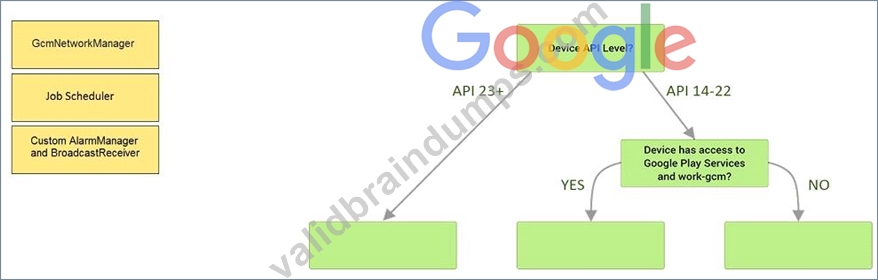
Answer:
Explanation: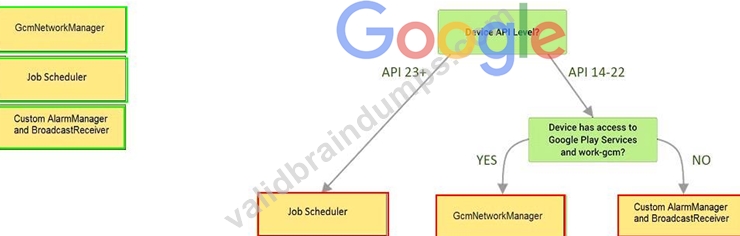
Explanation:
Videos:
Working with WorkManager, from the 2018 Android Dev Summit
WorkManager: Beyond the basics, from the 2019 Android Dev Summit
Reference:
https://developer.android.com/reference/androidx/work/WorkManager?hl=en
NEW QUESTION 19
When your code execution reaches the breakpoint, Android Studio pauses execution of your app. You can then use the tools in the Debugger tab to identify the state of the app. With Step Into you can
- A. advance to the next line in the code (without entering a method)
- B. evaluate an expression at the current execution point
- C. examine the object tree for a variable, expand it in the Variables view. If the Variables view is not visible
- D. continue running the app normally
- E. advance to the first line inside a method call
- F. advance to the next line outside the current method
Answer: E
NEW QUESTION 20
In a common Paging Library architecture scheme, move instances to the correct positions.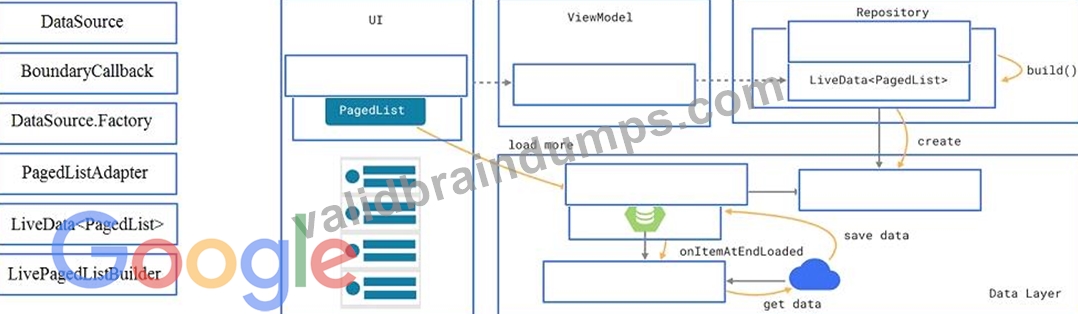
Answer:
Explanation: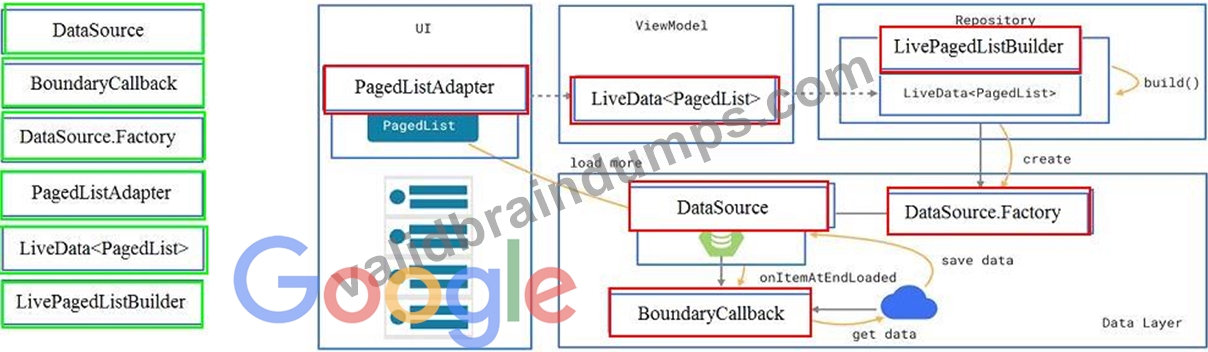
Reference:
https://developer.android.com/topic/libraries/architecture/paging/ui
NEW QUESTION 21
Which statement is most true about layout_constraintLeft_toRightOf and layout_constraintStart_toEndOf constraints ?
- A. layout_constraintLeft_toRightOf is equal to layout_constraintStart_toEndOf in case if user choose a language that uses right-to-left (RTL) scripts, such as Arabic or Hebrew, for their UI locale
- B. layout_constraintLeft_toRightOf is equal to layout_constraintStart_toEndOf in any case
- C. layout_constraintLeft_toRightOf is equal to layout_constraintStart_toEndOf in case if user choose a language that uses left-to-right (LTR) scripts, such as English or French, for their UI locale
- D. layout_constraintLeft_toRightOf works with horizontal axes and layout_constraintStart_toEndOf works with vertical axes
Answer: C
Explanation:
Reference:
https://developer.android.com/training/basics/supporting-devices/languages
NEW QUESTION 22
What method should we use with Notification.Builder to supply a PendingIntent to be sent when the notification is clicked?
- A. setContentIntent
- B. setContentInfo
- C. setDeleteIntent
Answer: A
Explanation:
Reference:
https://developer.android.com/training/notify-user/build-notification
NEW QUESTION 23
What statements about InputStreamReader (java.io.InputStreamReader) are correct? (Choose two.)
- A. An InputStreamReader is a bridge from character streams to byte streams: It reads characters using a specified charset and encodes them into bytes. The charset that it uses may be specified by name or may be given explicitly, or the platform's default charset may be accepted.
- B. Each invocation of one of an InputStreamReader's read() methods may cause one or more bytes to be read from the underlying byte-input stream. To enable the efficient conversion of bytes to characters, more bytes may be read ahead from the underlying stream than are necessary to satisfy the current read operation.
- C. No any invocation of one of an InputStreamReader's read() methods can cause some bytes to be read from the underlying byte-input stream.
- D. An InputStreamReader is a bridge from byte streams to character streams: It reads bytes and decodes them into characters using a specified charset. The charset that it uses may be specified by name or may be given explicitly, or the platform's default charset may be accepted.
Answer: B,D
NEW QUESTION 24
What is illustrated in the picture?
- A. Adding a watchpoint to a variable in memory
- B. The Breakpoints window lists all the current breakpoints and includes behavior settings for each
- C. The Variables and Watches panes in the Debugger window
- D. Debugging native code using LLDB
- E. Logcat window with filter settings
Answer: A
NEW QUESTION 25
Working with Custom View. Once you define the custom attributes, you can use them in layout XML files just like built-in attributes. The only difference is that your custom attributes belong to a different namespace. Instead of belonging to the http://schemas.android.com/apk/res/android namespace, they belong to:
- A. http://schemas.android.com/apk/res/[your package name]
- B. http://schemas.android.com/[your package name]
- C. http://schemas.android.com/apk/[your package name]
Answer: A
Explanation:
Reference:
https://developer.android.com/guide/topics/ui/custom-components
NEW QUESTION 26
The easiest way of adding menu items (to specify the options menu for an activity) is inflating an XML file into the Menu via MenuInflater. With menu_main.xml we can do it in this way:
- A. override fun onCreateOptionsMenu(menu: Menu): Boolean { menuInflater.inflate(R.menu.menu_main, menu) return true
} - B. override fun onOptionsItemSelected(item: MenuItem): Boolean {
menuInflater.inflate(R.menu.menu_main, menu) return super.onOptionsItemSelected(item)
} - C. override fun onCreate(savedInstanceState: Bundle?) { super.onCreate(savedInstanceState) setContentView(R.menu.menu_main)
}
Answer: A
Explanation:
Reference:
https://developer.android.com/guide/topics/ui/accessibility/custom-views
NEW QUESTION 27
Android Tests. You can use the childSelector() method to nest multiple UiSelector instances. For example, the following code example shows how your test might specify a search to find the first ListView in the currently displayed UI, then search within that ListView to find a UI element with the text property Apps.
What is the correct sample?
- A. UiObject appItem = device.findObject(new UiSelector()
.className("android.widget.ListView")
.instance(0)
.childSelector(new UiSelector()
.text("Apps"))); - B. UiObject appItem = device.findObject(new UiSelector()
.className("android.widget.ListView")
.instance(new UiSelector()
.text("Apps"))); - C. UiObject appItem = device.findObject(new UiSelector()
.className(ListView.class)
.instance(1)
.childSelector(new UiSelector()
.text("Apps")));
Answer: A
NEW QUESTION 28
Room can export your database's schema information into a JSON file at compile time. What annotation processor property you should set in your app/build.gradle file to export the schema?
- A. room.expandProjection
- B. room.incremental
- C. room.schemaLocation
Answer: C
Explanation:
android {
...
defaultConfig {
...
javaCompileOptions {
annotationProcessorOptions {
arguments += ["room.schemaLocation":
"$projectDir/schemas".toString()]
}
}
}
}
NEW QUESTION 29
By default, the notification's text content is truncated to fit one line. If you want your notification to be longer, for example, to create a larger text area, you can do it in this way:
- A. var builder = NotificationCompat.Builder(this, CHANNEL_ID)
.setContentText("Much longer text that cannot fit one line...")
.setStyle(NotificationCompat.BigTextStyle()
.bigText("Much longer text that cannot fit one line..."))
... - B. var builder = NotificationCompat.Builder(this, CHANNEL_ID)
.setContentText("Much longer text that cannot fit one line...")
.setLongText("Much longer text that cannot fit one line..."))
... - C. var builder = NotificationCompat.Builder(this, CHANNEL_ID)
.setContentText("Much longer text that cannot fit one line...")
.setTheme(android.R.style.Theme_LongText);
...
Answer: A
Explanation:
Reference:
https://developer.android.com/training/notify-user/build-notification
NEW QUESTION 30
Content labels. What attribute to use to indicate that a View should act as a content label for another View?
- A. android:labelFor
- B. android:contentDescription
- C. android:hint
Answer: A
Explanation:
Reference:
https://support.google.com/accessibility/android/answer/7158690?hl=en
NEW QUESTION 31
Assume that you have the following situation: The app code calls for R.string.text_a Three relevant resource files are available:
- res/values/strings.xml, which includes text_a in the app's default language, in this case English.
- res/values-mcc404/strings.xml, which includes text_a in the app's default language, in this case English.
- res/values-hi/strings.xml, which includes text_a in Hindi.
The app is running on a device that has the following configuration:
- The SIM card is connected to a mobile network in India (MCC 404).
- The language is set to Hindi (hi).
Which is the correct statement below?
- A. Android loads text_a from res/values-hi/strings.xml (in Hindi)
- B. Android loads text_a from res/values-mcc404/strings.xml (in English)
- C. Android loads text_a from res/values/strings.xml (in English)
Answer: B
Explanation:
Android loads text_a from res/values-mcc404/strings.xml (in English), even if the device is configured for Hindi. That is because in the resource-selection process, Android prefers an MCC match over a language match (as a priority Exception).
Reference:
https://developer.android.com/guide/topics/resources/localization
NEW QUESTION 32
What is the incorrect statement about Data Access Object (androidx.room.Dao)?
- A. Data Access Objects are the main classes where you define your database interactions. They can include a variety of query methods.
- B. It is recommended to have only one Dao class in your codebase for all tables.
- C. An abstract @Dao class can optionally have a constructor that takes a Database as its only parameter.
- D. The class marked with @Dao should either be an interface or an abstract class. At compile time, Room will generate an implementation of this class when it is referenced by a Database.
Answer: B
NEW QUESTION 33
To run your local unit tests, follow these steps:
1. Be sure your project is synchronized with Gradle by clicking Sync Project in the toolbar.
2. Run your test in one of the following ways (select possible): (Choose three.)
- A. To run all tests in Project, open the Project window, and then right-click a test and click Run .
- B. To run a single test, open the Project window, and then right-click a test and click Run .
- C. To test all methods in a class, right-click a class or method in the test file and click Run .
- D. To run all tests in a directory, right-click on the directory and select Run tests .
Answer: B,C,D
NEW QUESTION 34
The diagram below shows a basic form of the recommended architecture for apps that use Architecture Components. The architecture consists of a UI controller, a ViewModel that serves LiveData, a Repository, and a Room database. Drag modules to correct places.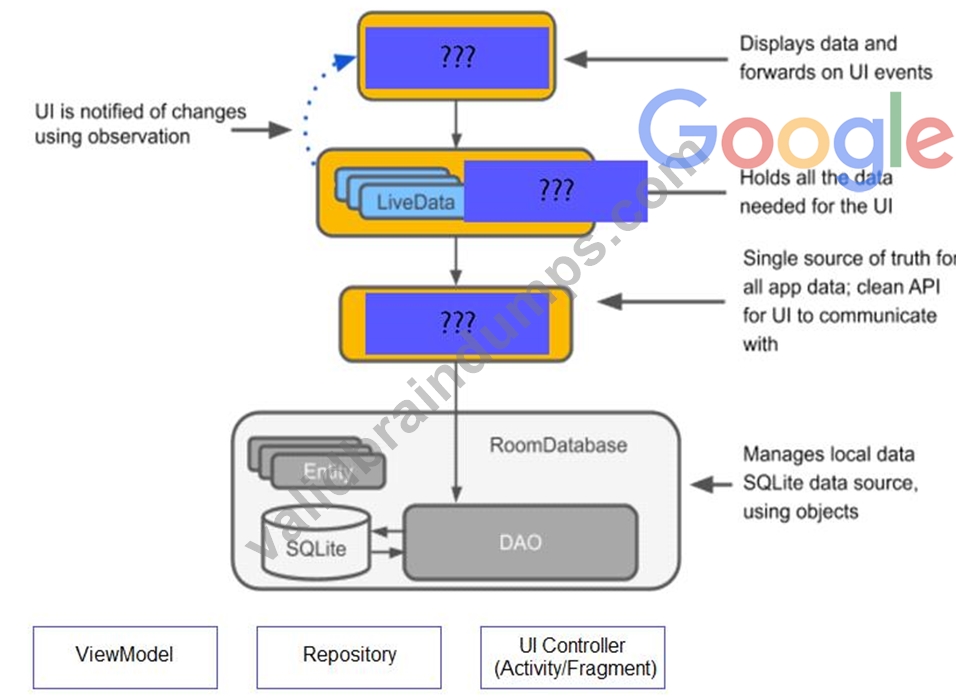
Answer:
Explanation: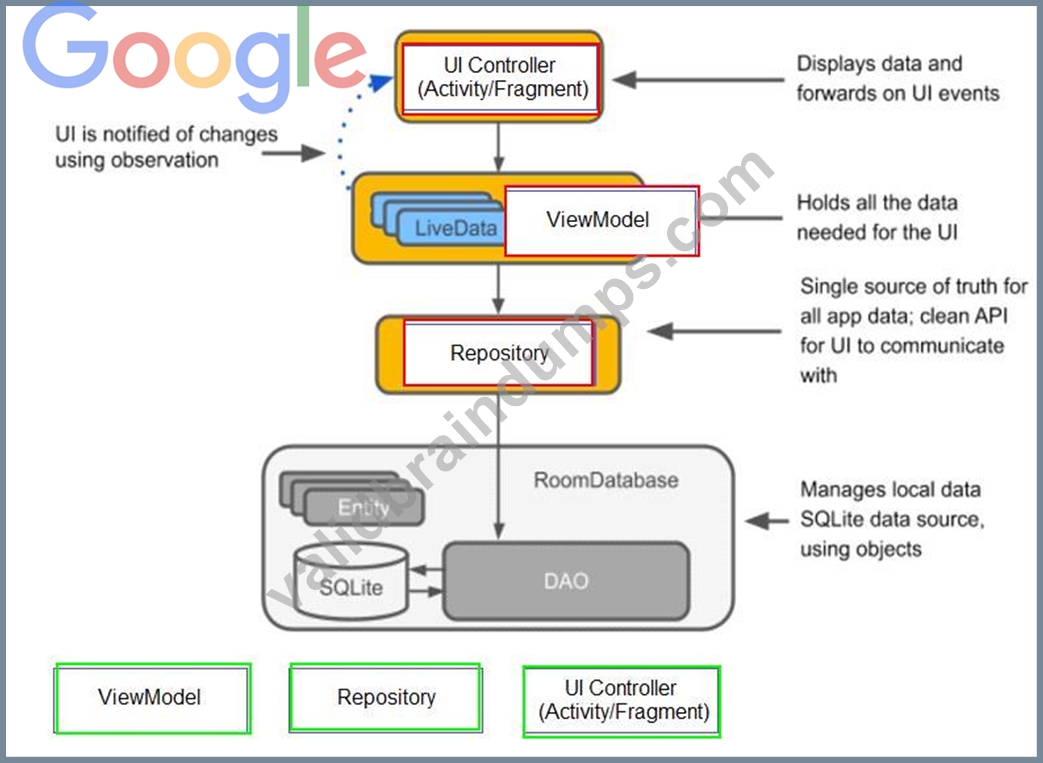
NEW QUESTION 35
......
Difficulty in writing the Google Associate Android Developer Certified Exam
Writing Google Associate Android Developer Certified could be very difficult for you if you do not have any experience in terms of on-premises developing android applications, still, this certification can be cracked by following some tips and tricks. This exam may go hard for you if you had not done its preparation properly. Many websites are offering the latest Google Associate Android Developer Certified questions and answers, but these questions are not verified by Google certified experts and that is why many are failed in their just first attempt. ValidBraindumps is the best platform which provides the candidate with the necessary Google Associate Android Developer Certified practice exam questions that will help him to pass the Google Associate Android Developer Certified on the first time.
The candidate will not have to take the Google Associate Android Developer Certified after different practice tests because with the help of Associate Android Developer Certified dumps the candidate will have every valuable material required to pass the certification. We are providing the latest and actual questions and that is the reason why this is the one that he needs to use and there are no chances to fail when a candidate will have valid dumps from ValidBraindumps. We have the guarantee that the questions that we have will be the ones that will pass the candidate in the Google Associate Android Developer Certified in the very first attempt.
In addition, the students should also develop competence in the content of the study guide. Below are the highlights of its topics:
Android Core: This section requires that the individuals have an understanding of Android system’s architecture and be able to explain the fundamental building blocks of the Android app. They also need to possess a good comprehension of the process required to develop, build, and run an Android application as well as be capable of displaying basic messages in a pop-up with the use of a ‘Toast’ or a ‘Snackbar’. The test takers should possess the skills in displaying messages outside the UI of an app with the use of ‘Notification’ and schedule background tasks with the use of ‘WorkManager’. Additionally, they should understand the process of localizing an app.
User Interface: This part requires that the applicants have an understanding of the activity lifecycle of Android. They should also be capable of creating an ‘Activity’ that shows a ‘Layout’ as well as constructing a UI using ‘ConstraintLayout’. The section also requires an understanding of how to build a custom ‘View’ class and include it to a ‘Layout’; familiarity with the process of implementing custom app themes and including accessibility hooks to the custom ‘View’. Additionally, the students should also understand how to apply the content descriptions to a view for accessibility. It is also important to understand the process of displaying items in a ‘RecyclerView’ and have the capacity to bind local data to the ‘RecyclerView’ list with the use of the Paging library. They should be able to implement both menu-based and drawer navigation.
Data Management: This topic measures the learners’ skills in defining data with the use of Room entities; accessing ‘Room’ database using a data access object; observing and responding to changing data with the use of ‘LiveData’. The applicants should also have competence in reading and parsing asset files or raw resources; using a Repository for mediating data operations; creating persistent Preference data from the user input; changing behaviors of an app based on the user preferences.
Debugging: This domain will evaluate your understanding of the fundamental debugging methods that are available within Android Studio. It will also measure the skills required for debugging and fixing issues associated with the usability and functional behavior of an app as well as the skills in using System Log to output the debug information. This section of the exam also requires an understanding of the process involved in using breakpoints in Android Studio and inspecting variables with the use of Android Studio.
Testing: This area requires a thorough understanding of the fundamentals of testing and the ability to write the functional local JUnit tests. It will also measure the understanding of the Espresso UI test framework as well as the skills in writing the functional automated Android tests.
Testing
- Recognizing the Espresso UI test framework.
- Knowing how to write useful automated Android tests.
- Understanding the basics of testing in depth.
- Ability to write local JUnit tests that are useful.
Google Associate-Android-Developer Pre-Exam Practice Tests | ValidBraindumps: https://www.validbraindumps.com/Associate-Android-Developer-exam-prep.html